Start Your Journey
Ready to Begin Your Learning Journey with IGNOU?
Whether you are a student, working professional, homemaker, or lifelong learner, IGNOU gives you the flexibility to continue your education from anywhere.
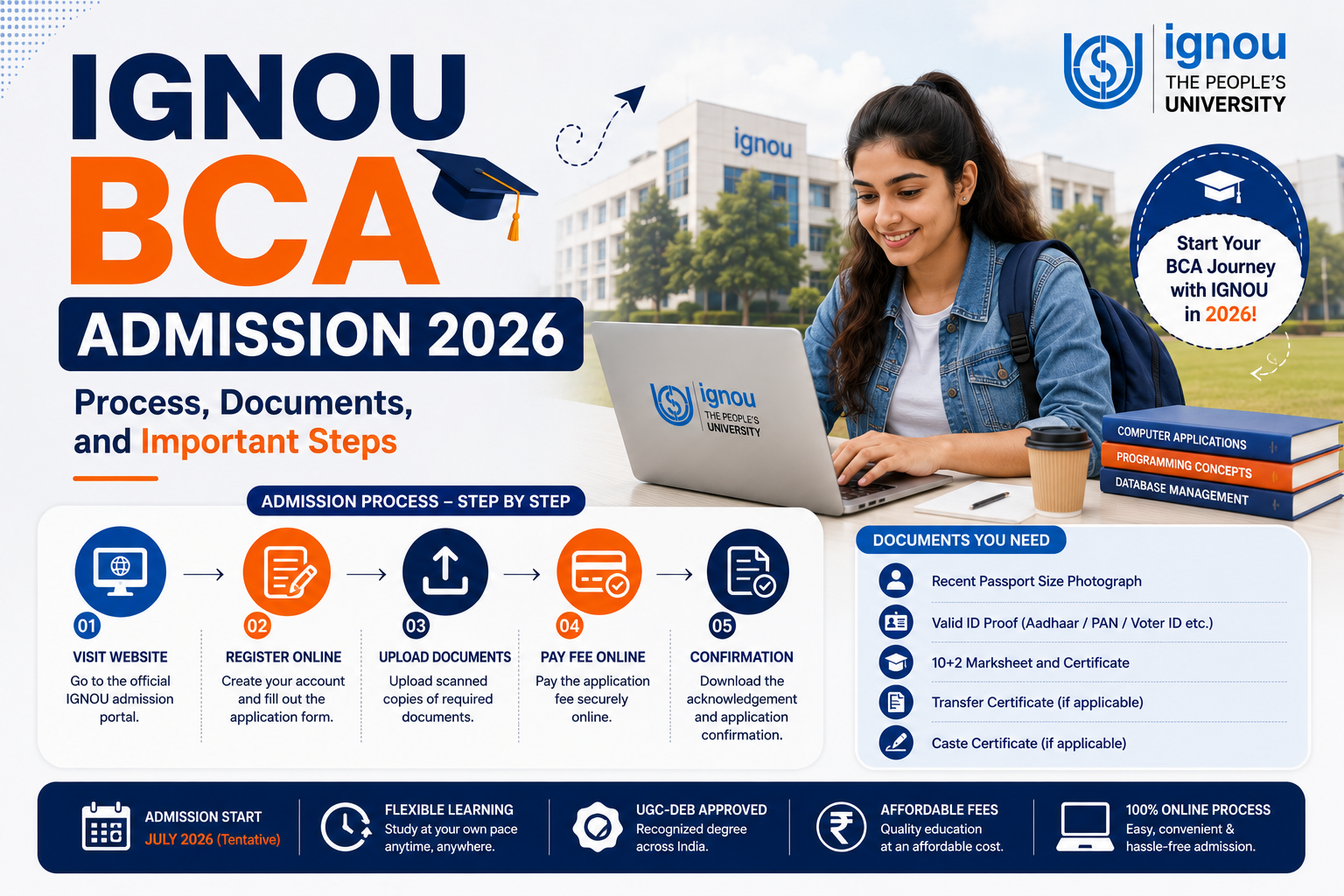
IGNOU BCA Admission 2026 is open to students who have completed 10+2 or an equivalent qualification. Applicants can choose the ODL BCA or the separately offered online BCA. The admission process includes registration, form completion, document upload, fee payment, and university verification.
For the July 2026 cycle, IGNOU’s official ODL and online admission portals currently list 31 July '2026 as the last date to submit the application, however every year IGNOU conducts admission in January and July.
IGNOU BCA Admission 2026: Quick Overview
Got More Questions?
Simple 4-step online process. No entrance exam for most programmes. Apply from home.
IGNOU BCA Course Admission: Step-by-Step Process
Step 1: Select the Learning Mode
Choose between BCA_NEW in ODL mode and BCA_NEWOL in online mode. Compare the fee, learning delivery, study material, practical support, and internet requirements.
Step 2: Read the Programme Details
Check the programme code, eligibility, duration, fee, and admission instructions.
Do not depend on an old fee table or previous admission deadline because IGNOU may revise programme information.
Step 3: Complete New Registration
Click New Registration and enter your own email address and mobile number. Complete the OTP verification and create a username and password.
Applicants should not use an agent’s contact details. IGNOU sends application updates and admission communication to the registered email address and mobile number.
Step 4: Fill in the Application Form
Enter your personal details, address, category, academic qualifications, and other requested information. Write your name exactly as it appears on your educational certificate.
Select the correct programme code. Choosing the wrong code or mode may result in admission to a different learning format.
Step 5: Choose the Regional and Study Centre
ODL applicants may need to select an available Regional Centre and Learner Support Centre. Choose a practical location because BCA includes lab and project components.
A nearby IGNOU centre may not offer support for every programme. Check whether BCA support is available before making the selection.
Step 6: Upload the Documents
Upload the photograph, signature, educational records, and category certificate where applicable. Follow the file format and size shown on the portal.
Make sure the certificate number, marks, issuing authority, and candidate details are readable.
Step 7: Preview the Form
Review the programme code, learning mode, spelling of the name, date of birth, category, academic details, centre selection, and uploaded documents.
Do not proceed to payment until every field is correct. The admission portal provides a form-preview option before final submission.
Step 8: Pay the Admission Fee
The portal accepts payment through credit card, debit card, net banking, and UPI. Pay only through the official admission portal and save the transaction reference.
After payment, log in again to confirm that the transaction and application were successfully recorded. Do not make another payment immediately merely because the first confirmation is delayed.
Step 9: Save the Submitted Form
Download the application form and payment acknowledgement. Keep the control number, username, receipt, and registered contact details safe.
These details may be required when checking the admission status or contacting the university.
Step 10: Track Admission Confirmation
Payment does not confirm admission immediately. IGNOU first verifies the applicant’s eligibility and documents.
Applicants should monitor their login, email, and SMS for confirmation or a discrepancy notice. Respond quickly when another document or correction is requested.
Admission remains provisional until the university completes verification and approves the application. Incorrect, incomplete, or invalid information may result in rejection or cancellation.
Who Can Apply for IGNOU BCA Admission 2026?
Students can apply if they have passed 10+2 or an equivalent qualification. IGNOU also accepts a Diploma in Commercial Practice or an equivalent qualification.
The current programme information does not list an entrance examination for BCA admission.
The medium of instruction is English. Students should also be comfortable using a computer because the course covers programming, databases, data structures, computer networks, cybersecurity, data analysis, software engineering, and project work.
ODL BCA vs Online BCA: Choose the Correct Mode
Many students search for IGNOU BCA course online admission when they only want to submit the form digitally. However, IGNOU offers both ODL and fully online BCA programmes.
IGNOU BCA in ODL Mode
The ODL programme uses the code BCA_NEW. Students receive academic support through Regional Centres and Learner Support Centres. Practical counselling is conducted at designated centres, and attendance requirements apply to lab courses.
IGNOU BCA in Online Mode
The online programme uses the code BCA_NEWOL. Learning is delivered through IGNOU’s online platform. Students need access to a computer, stable internet, and digital learning resources.
IGNOU states that students enrolling in an online programme should be comfortable studying through a computer and the internet. Printed study material is not provided for online programmes.
Both applications are completed online, but applicants must use the portal meant for their selected learning mode.
Documents Required for IGNOU BCA Admission 2026
Applicants should prepare clear scans from the original documents before starting the application.
Common Mistakes During IGNOU BCA Course Online Admission
Applicants should avoid:
Document verification can take time. Continue checking the portal until the application shows confirmed admission.
Applicants should also avoid submitting multiple forms unless instructed. Duplicate applications or payments may create unnecessary confusion.
Conclusion
IGNOU BCA Admission 2026 follows an online application process, but students must select the correct programme mode. BCA_NEW is offered through ODL, while BCA_NEWOL is the online programme. Both require eligible qualifications, clear documents, successful fee payment, and university approval. Before applying, compare the fees, learning format, practical requirements, study-centre availability, and digital access. Use only the official IGNOU admission portal and save every submitted document and payment receipt.
A careful application can reduce errors related to programme selection, documents, and payments. Applicants should also monitor official updates because admission deadlines may be extended.
Start Your Journey
Ready to Begin Your Learning Journey with IGNOU?
Whether you are a student, working professional, homemaker, or lifelong learner, IGNOU gives you the flexibility to continue your education from anywhere.